Business Value
Team Member licensed users can now access Financial Reports without an error message.
Feature Details
Team Member users could receive the following error when trying to open the Financial Report List page.
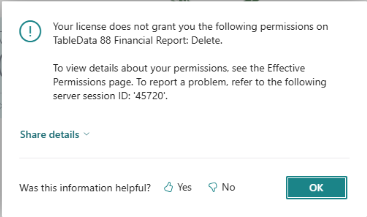
The error message was caused by a report refresh in Fundamentals for the two canned reports TC-SOA and TC-SOFP. The refresh on these two reports is used to ensure any report changes are captured. The automatic refresh of the reports will now be bypassed if a Team Member attempts to open the report list.
Was this article helpful?
That’s Great!
Thank you for your feedback
Sorry! We couldn't be helpful
Thank you for your feedback
Feedback sent
We appreciate your effort and will try to fix the article